If you want the short version: a phishing text message, also called smishing or SMS phishing, is a fake text from a company or person you trust, built to make you tap a link, hand over a login or one-time code, or send money. You can usually catch one in about two minutes by running seven checks, starting with the sender number and the link itself, without ever opening anything.
The reason this matters right now is that texts work differently from email. A text lands in the one channel you already trust, arrives outside any spam filter, and shows a truncated link on a small screen where you cannot read the full address. Security researchers have long put text open rates around 98 percent, which means a campaign that flops in an inbox often lands on a phone.
Below is the routine I use, and the one I give to family members who keep getting toll and delivery texts. It takes no special tools, costs nothing, and it works whether the message claims to be a courier, a bank, an employer or someone who already knows your name.
Table of Contents
- What You Need
- Step-by-Step: How to Spot a Phishing Text Message in 7 Checks
- 1. Check the sender’s number or name
- 2. Inspect the link without opening it
- 3. Look for urgency, threats, and unusual requests
- 4. Check for spelling, grammar, and visual inconsistencies
- 5. Verify through an official channel
- 6. Search for independent reports or warnings
- 7. Delete, block, and report the message
- Common Mistakes
- Frequently Asked Questions
- Can someone hack my phone from a text message?
- What happens if you text back a phishing text?
- What are two warning signs of a phishing message?
- Where can I forward phishing texts?
- What to do if you accidentally open a scam link?
- Is it better to block or delete spam text messages?
- Conclusion: What to Do First
What You Need
Five minutes, a phone you are not currently logged into anything sensitive on, and the real contact details for whoever the message claims to be. That last part matters most, and it has to be a source you already had before the text arrived, not one the text gave you.
- The original message, untouched. Do not delete it yet. Screenshot it, because a screenshot preserves the number, the link and the wording for a report or a police or bank claim later.
- A private, trusted device. Not a shared or public machine, and ideally not the device you bank on. If you do need to check something, keep it on the phone you would be willing to reset.
- The sender’s official details, held independently. The customer service number printed on the back of your bank card, the courier’s site you already have bookmarked, the HR contact in your own directory. Find these before you look at the text, not while you are panicking about it.
- A second route to verify. One official app you open from your home screen, or one website you type in by hand. Ideally two of them, so a single compromised inbox cannot confirm a fake.
- A little patience about reporting. If nobody else ever reports these, the same campaign keeps running against the same list of numbers, including yours.
Step-by-Step: How to Spot a Phishing Text Message in 7 Checks
1. Check the sender’s number or name
Start with who sent it. Real companies usually text from a short code of five or six digits, or from a number they publish on their website. An ordinary ten-digit mobile number in your contact-free list of senders is a weak signal on its own, and a number with a country code you do not recognise is a strong one.
The sender name your phone displays is not evidence of anything. Both major phone platforms let a sender set whatever name they want, so a contact can read Amazon or your bank while the underlying number is a prepaid SIM bought that morning. On iMessage and on Android, a number you have never messaged shows as a bare ten digits, which is often the first honest thing on the screen.
There is a viral idea that certain area codes mean scam, and it is worth dismantling. No fixed list of area codes to avoid exists, and carriers can reassign numbers, so an in-area number is not safer and a 626 number is not a scam by default. The only test that holds up is simple: does this number match the one the organisation publishes for its alerts, in its own app or on its own site?
Commenters in r/Scams and r/phishing report the same toll and delivery campaign arriving four or more times in a day from entirely different numbers, which is a good reason to judge the content rather than the caller. They also flag a newer category: iMessage threads with no history, an international prefix such as +56 9, and an opening line about a job. Nothing about it looks like a bank scam, which is exactly why it slips past people who have trained themselves to distrust bank texts.
2. Inspect the link without opening it
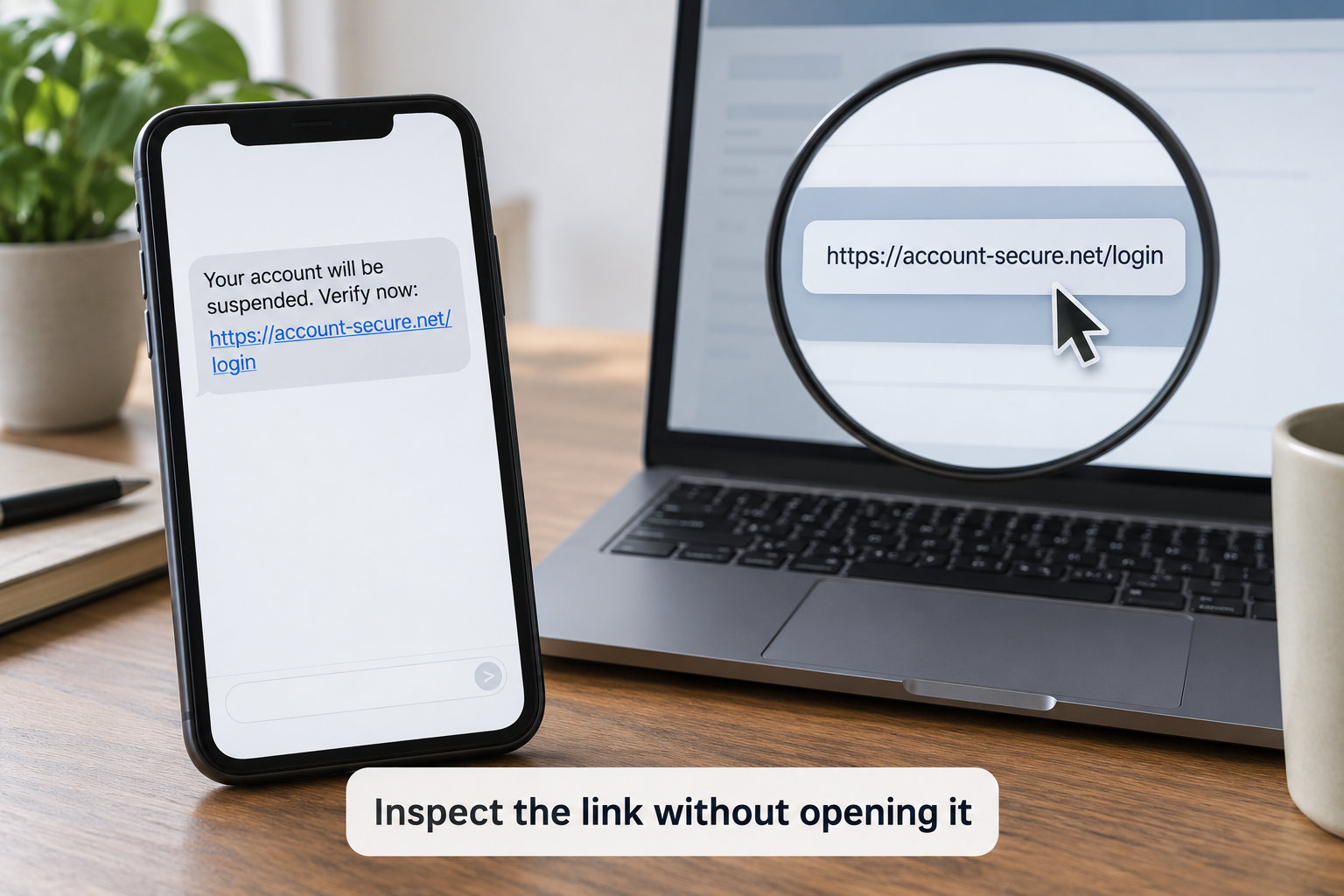
On both iPhone and Android, press and hold the link in the message and a preview appears with the full address, or tap and hold for a copy option. On a computer, hovering shows the same thing in the status bar. That is enough to read it. You never have to visit the page to know where it goes.
Read the address from right to left, the way domains are actually structured. A genuine courier warning comes from the carrier’s own domain. A fake one comes from something like usps-redelivery-support.com, where the real brand sits in the middle of a domain that belongs to somebody else. The part after the final dot is the part that decides who you are really dealing with, and it is usually where the impersonation hides.
Shortened links from services like bit.ly give you nothing to read, because the whole point is to hide the destination. A legitimate sender can give you a full, readable address without any difficulty at all. You will also meet misspelled variants of real brands, extra letters, hyphens before the dot, or a dot that is actually a different character. And the little padlock in the address bar means the connection is encrypted, nothing more; scammers obtain certificates for free, so treat a padlock as technical trivia rather than a trust signal.
3. Look for urgency, threats, and unusual requests
Scam texts are built on a deadline because deadline beats doubt. Typical pressure lines include an unpaid toll or fine that will grow daily, a package held at the depot for 24 hours, a card or account being suspended within the hour, a refund or prize waiting to be claimed, or a payroll or bank detail change that must be approved now.
Then look at what it wants from you. The request itself is the tell. Tapping a link, entering a username and password, entering a card number, sending a one-time code, buying gift cards, moving money to a crypto wallet, or replying to confirm anything. No bank, courier or tax office will text you to ask for a code it just sent you, and that sentence alone disposes of a large share of these messages.
A variant worth knowing about is the reply-to-unlock trick: the message says the link only works if you text back YES or STOP first. That is not a broken link, it is a filter. Your reply confirms the number is live and belongs to a person, and that confirmation is the most valuable thing a campaign can collect.
4. Check for spelling, grammar, and visual inconsistencies
Here is the advice that quietly went out of date. For years the standard line was that scam texts give themselves away with bad spelling and broken grammar, and you will still see it everywhere. Generative tools write clean, fluent, correctly punctuated copy in seconds, so a text that reads perfectly is no more trustworthy than one that does not. Spelling and grammar are now a weak signal, not a red flag.
Layout still betrays them, though. Look at the gaps and the branding: text that starts with a space, sentences run together without line breaks, a logo in the wrong colour or the wrong font, a brand spelled with a swapped letter, a greeting that says Dear Customer when the company has your name on file. Those inconsistencies survive because nobody checks the layout of a message assembled from stolen brand pieces.
One more mismatch is worth a separate look: the language of the message versus the account it came from. An iMessage arriving in Spanish to a household that does not read Spanish, or a text in flawless English to a phone number registered overseas, is worth abandoning on principle.
5. Verify through an official channel
This is the step that actually stops the fraud, and it is the one people skip. Verify through a channel you chose, never one the message offered. Open the banking or courier app from your home screen and check for the notice yourself. Type the company’s web address by hand rather than following anything you were sent. Call the number printed on the back of your card, or the number in the paper statement.
Never use a phone number, link or email address from inside the suspicious message, even to ask whether the message is genuine. Those channels are staffed by the people running the scam, and in the current wave of bank impersonation texts the handoff is deliberate: the text asks you to call a fake fraud agent who talks you into moving money on the call.
If the organisation has no record of the message and no reason to contact you, you have your answer. That check takes two minutes and it is the one that reliably ends the situation.
6. Search for independent reports or warnings
When a message names a real organisation, it is worth two minutes of searching. Check the company’s own security or news page, and the alert pages run by consumer-protection bodies, which publish warnings about active delivery, toll and bank impersonation campaigns. Searching the claimed brand plus the word scam plus the current year usually surfaces an official warning within the first few results.
Community threads on r/phishing and r/Scams are useful in a different way. People post screenshots there constantly, and if the same wording and the same lookalike domain turn up in several threads over a few days, that is a real pattern rather than a guess. Treat it as a signal, not a verdict. A single post can be wrong, a screenshot can be doctored, and an anxious reply from a stranger is not verification.
The same caution applies to search results in general, and especially to paid results. Scam lookup sites and anything ranking above the official domain are often advertising to the same audience the scammers want to reach. If the top hit is not the organisation’s own domain, keep scrolling.
7. Delete, block, and report the message
Once you have decided it is fraudulent, work in this order. Screenshot it for your records. Report it from inside the messaging app, using the report or junk option, which flags the number for your carrier. Then delete the conversation rather than archiving it, so nobody in the household opens it later out of curiosity.
Forward it to 7726, spelled SPAM, which passes it free to your carrier and puts the number on a block list. Reporting losses or shared details goes to the Federal Trade Commission’s ReportFraud site; cybercrime reports, including business impersonation, go to the FBI’s Internet Crime Complaint Center at ic3.gov. If you handed over identity documents, identitytheft.gov is where the recovery plan starts.
Blocking is worth doing, but do not treat it as a fix. A campaign rotates numbers, so a number you blocked this morning can be replaced by lunchtime, which is exactly the frustration people describe in forums after blocking four delivery texts in one day. Filtering unknown senders in your messaging settings, and turning on your carrier’s built-in filtering, catches more of them than blocking alone.
Common Mistakes
Replying, even to say STOP. A reply confirms the number is live and in use by a person, and it improves your listing on resale markets, so expect more of the same. Fix: report through the app, forward to 7726, delete, and say nothing.
Opening the link to see what it says. The page loading is not the risk, but it is how the credential harvesting page starts collecting what you type, and how some campaigns push a file that installs something outside the app store. Fix: read the address with a press and hold, then close the thread.
Trusting the name on the screen. Display names are chosen by the sender, not verified by your carrier. Fix: judge the number and the content, and verify through an official channel.
Reading the padlock as a seal of approval. It means encrypted connection, full stop. Fix: read the domain name, which is where the decision actually lives.
Sharing a verification code. No legitimate organisation will ask for it, and that is the whole trick behind the real-time relay attack, where a code you read out is used to log in before it expires. Fix: end the conversation and call the number on your card.
Forwarding the message to warn family without saying what it is. You have just handed the campaign new reach. Fix: screenshot it, describe it in your own words, and never forward the live link.
Three habits close most of the remaining gaps. Turn on two-factor authentication with an app rather than SMS codes where you can, so a stolen code is worth less. Set a short lock on your banking app and keep alerts switched on, so a strange login attempt reaches you in seconds. And have one honest conversation with an older relative about the three things nobody will ever ask for by text: a password, a one-time code, and money moved on request.
Frequently Asked Questions
Can someone hack my phone from a text message?
Usually not on its own. Tapping a link on a modern phone does not by itself install anything, because iOS and Android both sandbox apps and browsers. The real danger is what happens after: typing your password on a fake login page, entering card details, or installing an app from outside the official store. If you only tapped and closed the message, close your browser and check for an unfamiliar app or notification permission.
What happens if you text back a phishing text?
Your reply confirms the number belongs to a real person who is running a campaign, and that confirmation raises the value of the number on lists sold to other senders. That is why replying STOP can make things worse rather than better. In some campaigns the reply is also what hands you to a second stage, a fake support agent who talks you through a payment. Do not reply, report the message instead.
What are two warning signs of a phishing message?
The two most reliable are urgency with a deadline, and a request for something only you and your bank would know, such as a password or a one-time code. A third close behind is a link whose domain does not match the company it names. Grammar is no longer one of the strongest signs, because scam copy is now routinely generated and reads cleanly.
Where can I forward phishing texts?
In the United States, forward the message to 7726, which spells SPAM, and your carrier adds the number to a block list at no charge. Report the message from inside the app as well, since that reaches the carrier faster. For anything involving money or shared personal details, file it at the FTC’s ReportFraud site, and for cybercrime go to the FBI’s Internet Crime Complaint Center at ic3.gov.
What to do if you accidentally open a scam link?
Close the page, do not enter anything, and check your apps for one you do not recognise, plus any new notification permission. If you only tapped and came back, that is usually the end of it. If you entered a password, change it from the real site immediately and sign out of other sessions. If you entered card details, call your bank, and if you shared a one-time code, change the password on that account first.
Is it better to block or delete spam text messages?
Do both, in that order of usefulness. Reporting the message through the app and forwarding it to 7726 is what actually reduces future texts, because your carrier and the agencies use those reports to act on the number. Blocking stops that one number from reaching you, though campaigns rotate numbers, so pair it with unknown-sender filtering. Deleting keeps your thread list clean but by itself does nothing to protect you.
Conclusion: What to Do First
Stop before you tap, and give yourself thirty seconds rather than a reaction. A phishing text message almost always carries a deadline, and the deadline exists to stop you checking. Read the domain with a press and hold, notice whether the message wants a code, a password or money, and then verify through the app or the number on the back of your card rather than anything inside the text.
If it fails that check, screenshot it, report it in the app, forward it to 7726, then delete and block. If you already tapped, the fastest way to learn whether you spot a phishing text message that got past you is to work out what you did next, not how long you waited: nothing entered is usually fine, a password needs changing today, a shared code needs an account check, and money sent needs a call to your bank and to the police, quickly. That order is the whole job.